DSM-G600, DNS-3xx and NSA-220 Hack Forum
Unfortunately no one can be told what fun_plug is - you have to see it for yourself.
You are not logged in.
Announcement
IRC Channel #funplug on irc.freenode.org
#1 2008-08-21 16:25:27
- Tcheub
- Member
- Registered: 2008-08-21
- Posts: 8
Permission denied with Clutch
Hello,
I've just installed Transmission-Clutch without any issue but I cannot download torrents. I don't understand what is wrong.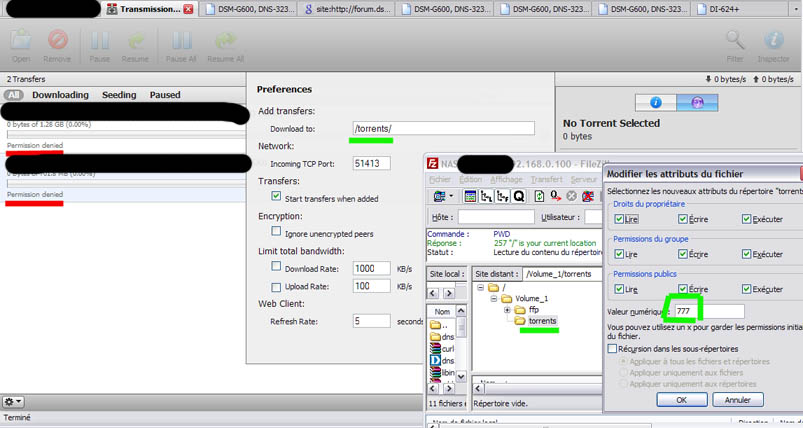
Do you have an idea? 
Offline
#2 2008-08-21 18:20:39
- Pejn
- Member
- Registered: 2007-12-17
- Posts: 61
Re: Permission denied with Clutch
try download location /mnt/HD_a2/torrents
Offline
#3 2008-08-22 15:22:39
- Tcheub
- Member
- Registered: 2008-08-21
- Posts: 8
Re: Permission denied with Clutch
Thanks Pejn for your answer.
I tried "/mnt/HD_a2/torrents" but it's the same. However, after reboot the NAS, location isn't "/mnt/HD_a2/torrents" anymore but "/". I check the file .transmission-daemon and it's 777. I don't understand
Offline
#4 2008-08-22 15:46:39
- Pejn
- Member
- Registered: 2007-12-17
- Posts: 61
Re: Permission denied with Clutch
hm looking at your picture you can try /mnt/HD_a2/ffp/torrents, dont think you have to reboot your nas but maybe restart transmission not sure, you can do that with sh /mnt/HD_a2/ffp/start/transmission.sh restart if you have set right permissions on that file
Offline
#5 2008-08-22 20:13:04
- Tcheub
- Member
- Registered: 2008-08-21
- Posts: 8
Re: Permission denied with Clutch
It still doesn't work.
Here my configuration file settings.json
Code:
{
    "blocklist-enabled": 0,
    "download-dir": "/mnt/HD_a2/torrents",
    "download-limit": 100,
    "download-limit-enabled": 0,
    "encryption": 1,
    "max-peers-global": 200,
    "peer-port": 51413,
    "pex-enabled": 1,
    "port-forwarding-enabled": 0,
    "rpc-access-control-list": "+127.0.0.1",
    "rpc-authentication-required": 0,
    "rpc-password": "",
    "rpc-port": 9091,
    "rpc-username": "",
    "upload-limit": 100,
    "upload-limit-enabled": 0
}
Do you see anything wrong in this configuration? Because this file (torrents) is 777.
Offline
#6 2008-08-23 01:33:24
- Pejn
- Member
- Registered: 2007-12-17
- Posts: 61
Re: Permission denied with Clutch
hmm in my settings.json
"download-dir": "\/mnt\/HD_a2\/TORRENTS",
dont know why in clutch i have /mnt/HD_a2/torrents
Offline
#7 2008-08-23 22:00:32
- Tcheub
- Member
- Registered: 2008-08-21
- Posts: 8
Re: Permission denied with Clutch
Finally it works!
In my settings.json file I have
"download-dir": "\/mnt\/HD_a2\/.transmission-daemon\/done",
In clutch
/mnt/HD_a2/.transmission-daemon/done
And the file done rights are 777.
Offline